
How it works
There are three parts, and none of them is an app on the phone.
- A guide, one Markdown file, written for Claude Code to follow. It sets the rules (back up first, never remove an icon, stop after two failures) and the steps.
- A Python script of about 400 lines, included at the bottom of the guide. It reads the Home Screen layout, checks a proposed layout, writes it and puts an old one back.
- pymobiledevice3, an open-source Python library that talks to iPhones over USB. The script uses the same icon-layout interface that iTunes once used to arrange apps from a computer.
You plug the phone in, unlock it, start Claude Code in a folder that holds the guide and say "read the guide and follow it". The guide is written for Linux, Windows or a Mac, and I ran it on Linux. Nothing is installed on the phone and there is no jailbreak.
The split of work matters. The script never decides where anything goes, and Claude Code never writes to the phone directly. Claude Code reads the list of apps, proposes a layout as a JSON file, and the script refuses that file unless every icon in the current layout appears in it exactly once.
Before installing anything: check the library
The library installs 89 other packages with it. A tool that can talk to a trusted, unlocked phone is exactly the kind of thing worth checking before it runs, so I asked Claude Code to vet it first and install it only if it was safe. It did this:
- Downloaded all 90 packages as files, without running any of their code.
- Compared the SHA-256 hash of every file with the one PyPI publishes.
- Looked every package and version up in the OSV vulnerability database. There were no advisories.
- Searched the unpacked code for the usual signs of a poisoned package: start-up hooks, obfuscated or encoded payloads, reads of credentials and keys, and unexpected network calls.
- Read where the main library connects to. The only outbound calls are in its firmware, activation and developer-image commands, which this job never uses.
The verdict was clean, with the limits stated: compiled binaries and the large mainstream dependencies were pattern-scanned, not read line by line. The install then used those same checked files, offline, so what ran was what had been checked.
The safety design
Everything the script does is built around not losing an icon:
- Backup first. Each read and each write saves the current layout to a dated file. Backups are never overwritten or deleted.
- A plan is refused if it is not complete. An app that is missing, listed twice or unknown stops the run before anything reaches the phone. So does a page, folder or dock that holds more than the device allows.
- Read back after writing. The script reads the layout again and compares it with the plan, page by page.
- One command to undo.
restorewrites any backup file back to the phone.
What went wrong, twice
1. Widgets looked like empty folders
On iOS 27 a widget is stored with the same list field a folder has, only empty. The script took my three widgets for unnamed, empty folders, and a layout built from that reading would have lost them. Claude Code caught it while checking the first read, before anything was written. The fix was one condition in one function. To prove it, the script rebuilt the layout with no changes and the result was compared with the backup. They were identical.
2. Ten apps the phone had not mentioned
The first write worked, and the read-back did not match. iOS had added a third page holding ten apps that were not in the layout the phone had reported: apps that had been sitting on Home Screen pages I hid years ago. The planned pages were intact. Claude Code read the layout again, filed the ten apps into the right folders and applied a second plan within the same minute. That one matched.
Why the read-back matters. The write command reported success both times. Only the comparison afterwards showed that the phone had ended up somewhere different from the plan. A tool that stopped at "the command worked" would have left a stray page and never said so.
The result
| Before | After | |
|---|---|---|
| Pages | 13 | 2 |
| Apps on the Home Screen | 291, plus 10 on hidden pages | 301 |
| Widgets | 3 | 3 |
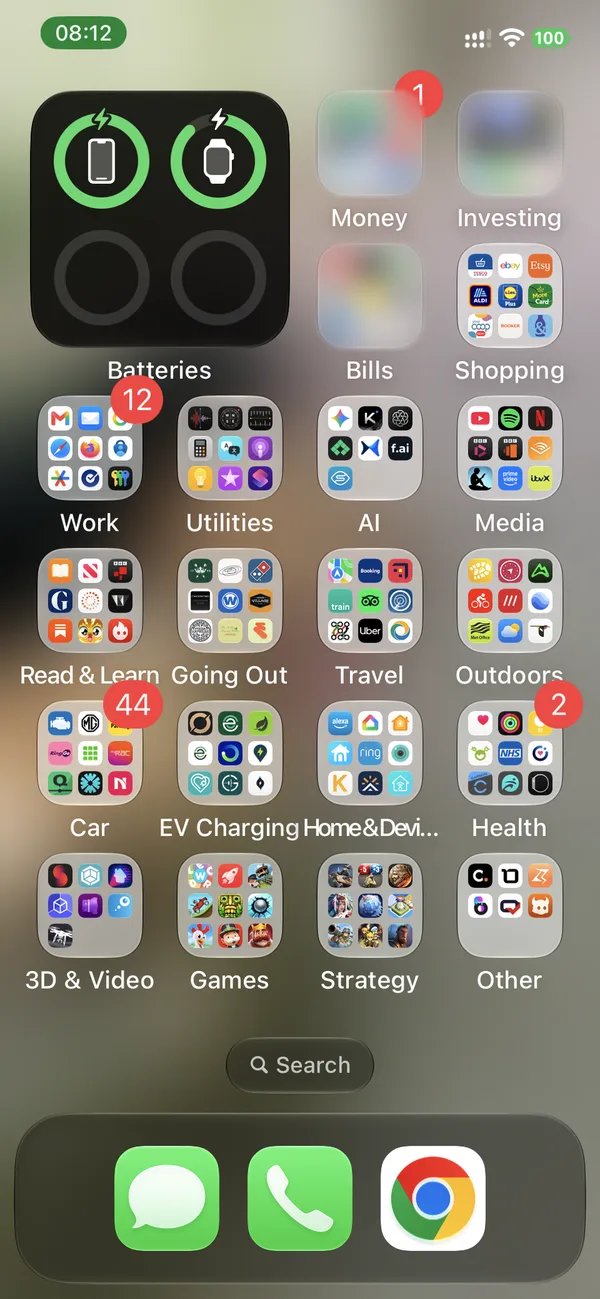
| Folders | 2 | 21 |
| Dock | 4 apps | 3 apps |
The guide offers a few styles. I took the one Claude Code recommended, which it calls "everyday first": leave the first page alone, because that is where the muscle memory is, and sort everything else into folders by what the app is for. Money, Bills, Travel, EV Charging, Home and Devices, and so on. Six apps it could not place with confidence went into a folder called Other instead of being guessed at.
I made one change to its proposal. Instagram was in the dock and I hardly use it, so it moved to a folder and the dock has a free space.
Then the iPad
The iPad was worse: fourteen pages. An iPad is not a big iPhone as far as layout goes. Mine has 30 icons to a page, 16 to a folder page and room for 16 in the dock, and other models differ. The iPhone script had the iPhone's numbers written into it.
So the iPad version asks the device. It reads the grid, folder and dock sizes that the iPad itself reports and checks the plan against those. Two more changes came from having two devices on one desk:
- Each backup records which device it came from. Writing or restoring a layout to a different device is refused. A phone layout written to a tablet would be a bad afternoon.
- A page left exactly as it was is always accepted. My first iPad page holds more widgets than the script's cautious arithmetic allows, and it plainly fits, because it is already there.
The iPad went from fourteen pages to two, with 388 apps and 7 widgets all in place. It also produced ten apps from hidden pages on the first write, so that is normal behaviour and the guide now says to expect it.
What Claude Code did, and what I did
Claude Code vetted and installed the library, read both devices, found and fixed the widget bug, decided which of 300 apps belong together, wrote the plans, applied them, checked the results and rewrote the guide for the iPad. I chose the style, took Instagram out of the dock, unlocked the devices and looked at the screens.
One thing I would flag. The guide tells Claude Code to show the plan and wait for a clear yes before writing. I had said that I had a fresh backup and would restore if I did not like the result. It took that as the yes, wrote the layout without showing me the plan, and told me so afterwards. The outcome was fine and the backups were there, but if you use the guide, expect to be shown the plan, and ask for it if you are not.
Limits worth knowing
- The interface is unofficial. It works on iOS 27.0.1 and iPadOS 26.7.3 today. Apple could change it in any update.
- Your app names go to the AI model so that it can sort them. If your list of apps is private, think about that first.
- Restore has not been needed yet. The backups are verified copies of the layouts, but I have not run the undo command on a real device, because I like the result.
- Apps that live only in the App Library are not touched. Only icons on the Home Screen move.
Try it
Both guides are on GitHub, each a single file with its script inside: github.com/BrianWillows/organise-iphone-home-screen. Take a full backup of the device first, as I did, then save the guide in an empty folder, start Claude Code there and tell it to read the guide and follow it.
The pattern is the same one I use on client websites: a written procedure, a small script that refuses unsafe input, a backup before every write and a check of the real result afterwards. It is why I am comfortable letting an AI tool change 35 live websites in a weekend or upgrade an old Drupal site. If you have a job like that, get in touch.